



Video isn’t optional anymore; it’s the lever that moves listings fast. Homes with video draw 403 percent more buyer inquiries, yet only 38 percent of agents add it, says Resimpli. AI can close that gap by turning photos, listing copy, or phone clips into polished videos in minutes.
In this guide we rank nine stand-out tools we’ve tested, explain our scoring system, and show exactly when each one earns its subscription fee—so you can press “record” with confidence.
How we picked the winners
Before we crown a “best,” we put every contender through the same test.
We started with a long list of fifteen tools agents mention in Facebook groups and on Reddit. Each one had to turn raw listing assets into a finished video in under thirty minutes and cost a solo agent no more than a nice dinner each month.
From there, we scored them across five weighted criteria that match real-world priorities:
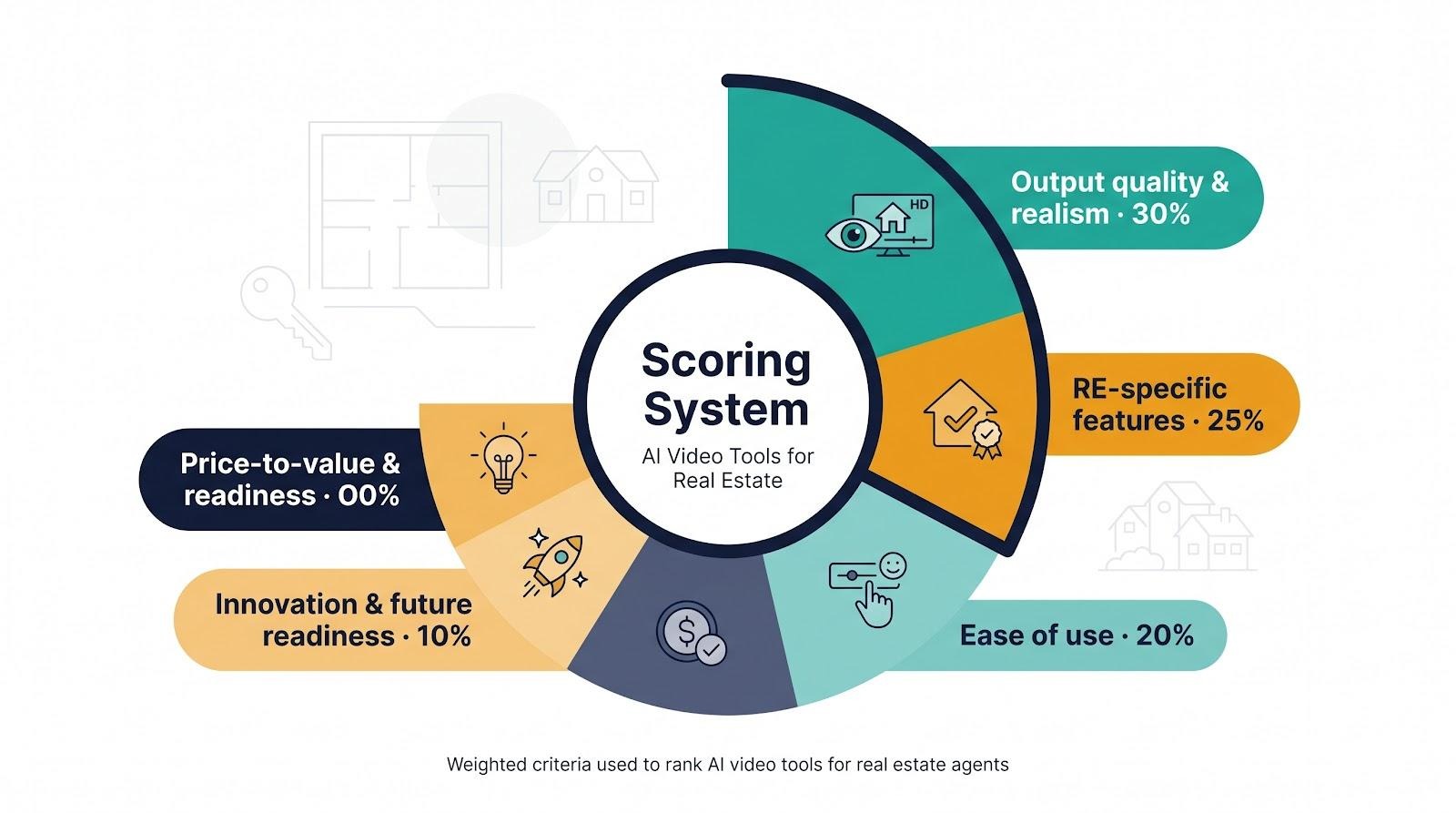
Output quality and realism carried the heaviest weight at 30 percent; blurry cabinets or warped walls push buyers away.
Real-estate-specific features, such as MLS-safe exports and auto-branding, counted for 25 percent.
Ease of use sat at 20 percent because most agents would rather show homes than edit timelines.
Price-to-value made up 15 percent; tokens or minutes had to translate into usable videos for far less than the cost of a latte.
Innovation and future readiness rounded out the final 10 percent, rewarding tools that already support vertical video, voice cloning, or text-to-video creation.
Three of us then built identical sample projects. Each included fifteen listing photos, a short description, and targets for both horizontal and vertical outputs. We timed every step from upload to download and combed G2, Capterra, and user forums for reliability gripes or hidden limits.
The composite scores produced a clear top nine. A tie went to the platform with broader real-estate adoption, followed by the lower effective cost per finished clip.
That’s the math behind the ranking you’re about to see. Now let’s jump into the first tool on the list.
1. Leonardo AI: instant “wow” shots you never filmed
Picture opening a listing video with a silky drone fly-over, even though you never hired a drone. That is the trick Leonardo AI pulls off.
The platform’s Motion model turns a text prompt, or better yet a single listing photo, into a five-second HD clip that respects start and end frames, which is why we call Leonardo AI the best video generator for animating still images. Its Instant Animate blueprint can take that still exterior and breathe in a slow, cinematic push-in before you finish typing the listing price.
Type “sunset glide over modern farmhouse,” and it renders a smooth aerial sweep with golden lighting in about five seconds. We tried three prompts, stitched the results between photo slides, and test viewers assumed we had paid for pro B-roll.
Quality stays high because the engine interpolates extra frames instead of jerky GIF-style hops. It also delivers horizontal and vertical versions automatically, so one prompt serves YouTube and Reels.
Ease matters too. Leonardo’s interface is a single text box with style presets. No timeline and no layers mean you can make eye-catching intros on a laptop while the photographer is still packing up.
Pricing is friendly. The free tier offers about 150 tokens per day, enough for a handful of clips. Paid plans start at $12 per month for larger token banks, and every file downloads watermark-free with commercial rights.
Know the limits. Each clip tops out at five seconds, and the footage is generative, not the actual house, so include real photos for substance. Label AI scenes clearly to avoid confusion.
Use Leonardo AI when you need a thumb-stopping opener such as a twilight exterior, neighborhood skyline, or crackling fireplace without booking a reshoot. Two minutes of prompting can lift the perceived production value of an entire video.
2. Fliki: turn photos and text into a narrated tour in five minutes
Fliki feels like a push-button listing video factory.
Drop in your MLS description, upload property photos, choose a voice, and five minutes later Fliki returns a finished tour with music, captions, and gentle Ken Burns motion. No timeline scrubbing, no audio syncing, and no late-night tutorials; just a share-ready file you can post before the photographer emails the final image set.

Fliki AI narrated real estate photo tour editor screenshot
Real-estate detail is baked in. Fliki automatically builds two versions of every video: one with your logo and call to action for social, and another unbranded copy that meets MLS rules. That small step saves the double-export shuffle most editors require.
The narration engine is flexible. Choose from more than 2,000 human-sounding voices in dozens of accents, or clone your own voice so buyers feel as if you are guiding them through the home. We tested a British male voice on a historic Tudor and a warm Southern voice on a farmhouse; both felt natural and needed no fixes.
Template logic follows real-estate flow. The default order moves from front exterior to living spaces, then ends on the backyard and contact slide. You can reorder shots, but most agents like the built-in pacing.
Cost efficiency stands out. The standard plan costs about the same as a streaming subscription and covers roughly one hundred 90-second videos per month, which works out to pennies per tour—far cheaper than a freelancer or a weekend in iMovie.
Limits exist. Output is confined to photo-pan slideshows, so marquee luxury listings may still need live-action footage. The default background track can feel generic, though swapping it takes two clicks.
For volume listing agents, Fliki is the dependable workhorse: consistent, quick, and simple enough to hand off to an assistant while trusting every video will stay on brand.
3. InVideo AI: crank out vertical Reels and ad creatives in minutes
Social feeds move fast, and polished vertical clips are the currency. InVideo’s new AI mode exists for one job: help you produce thumb-stopping videos without a full editor.
Type a plain-English prompt such as “20-second Instagram Reel for 123 Maple, spotlight the pool and quartz kitchen counters, upbeat vibe,” and the engine assembles a draft on its own. It writes a hook, grabs stock footage to fill gaps, adds animated captions, and times cuts to the music beat. Two minutes later you are tweaking, not building.
InVideo AI vertical real estate Reel creation interface screenshot
Every output defaults to a 9:16 frame, so the focal point stays centered even when the homeowner’s dog sprints through the shot. The AI also layers bold text overlays that pulse word by word, which helps viewers who watch on mute.
Consistency is locked in once you set your brand kit. Colors, fonts, and logo placement carry across each clip, so a small brokerage looks as if it has an in-house creative team.
Price rests at about twenty-five dollars a month for fifty AI videos, each export ready for Instagram, TikTok, Facebook, or YouTube Shorts. A freelancer often charges the same for one deliverable, so the cost per clip is low.
Keep two cautions in mind. Rely only on the AI’s stock shots and you may show a kitchen that is not your listing. Swap placeholders for actual photos or quick phone clips. Also, long tours do not fit here; InVideo tops out at about sixty seconds, so think teaser rather than full walkthrough.
Used well, InVideo is a speedy content tap. New listing? Enter a prompt at lunch and post a polished Reel before dessert. That frequency keeps your name and your properties top of mind in the endless scroll.
4. Synthesia: put a camera-ready “you” on screen without pressing record
Some days the hair will not cooperate or the calendar is packed, yet you still need an on-camera intro that feels personal. For agents who also create still images for social media or marketing materials, AI editing tools can make quick adjustments to portraits—for example, experimenting with a grey hair filter before deciding which version best fits a particular campaign. Synthesia solves the video side of that challenge by letting an AI avatar speak while you handle business.
Getting started is simple. Type a script or paste bullet points, pick from more than one hundred realistic presenters, and click generate. About a minute later the avatar reads your words with natural lip sync and subtle gestures in crisp high definition.
The real advantage appears when you add languages. Select Spanish, Mandarin, or French, and the same avatar delivers your market update without extra recording. For agents courting overseas buyers or bilingual communities, that speed matters.
Branding stays flexible. Drop the avatar beside listing photos, overlay bullet points, or place it in a virtual studio. A thirty-second avatar welcome pairs well with a Fliki photo tour: buyers meet “you,” then move through the property without lights or cameras.
Pricing starts at roughly ten dollars a month for ten video minutes, which covers most listing intros. Heavy users can upgrade, and a one-time fee creates a custom avatar cloned from your own footage if you want a perfect digital twin.
Know the limits. Viewers with a sharp eye may notice the avatar is not human, so reserve it for informative segments rather than heartfelt testimonials. Because Synthesia focuses on the talking presenter, you still need real property visuals to keep buyers engaged.
Used thoughtfully, Synthesia becomes an always-available co-host that delivers polished, multilingual clips and frees you from last-minute filming hassles.
5. AutoReel: one-click listing videos straight from your MLS link
AutoReel is the tool you open when you have twenty fresh photos, no spare time, and sellers expecting a video by dinner.
Paste the listing URL from Zillow or your MLS, and AutoReel scrapes every image, checks resolution, and generates a polished walkthrough without you touching a timeline. It chooses gentle pans for wide rooms, quicker cuts for detail shots, and pairs everything with royalty-free music that lands on the beat.
Speed impresses. In our tests a full sixty-second clip rendered in eight minutes, which is long enough to answer an email but not long enough to lose momentum.
Real-estate niceties are built in. Toggle a branded outro for social or remove every logo for MLS compliance with one switch. Text overlays pull property stats directly from the listing, so bed-bath counts stay accurate even if data changes before closing.
AutoReel runs on credits, and the math works out to roughly two dollars per finished video on the mid-tier plan. That is far less than a videographer or most AI competitors.
Drawbacks remain. Styling is template driven, so every video follows the same rhythm unless you adjust manual settings. Because the tool relies on source photos, poorly lit shots stay poorly lit; AutoReel cannot correct bad photography.
For agents managing multiple listings, AutoReel feels like a speed boost: one link in, export out, and you are back to prospecting while others are still importing files.
6. CloudPano: immersive 360° tours without Matterport’s price tag
Photos hint at flow and videos guide buyers, but nothing beats letting prospects explore a property at their own pace. CloudPano makes that possible without a four-figure camera or costly hosting.
Snap panoramas on a Ricoh Theta or a modern phone, upload them, and CloudPano stitches a clickable tour in about fifteen minutes. Hotspot arrows appear automatically so visitors jump from foyer to kitchen with one tap, and a dollhouse view helps them grasp the layout instantly.
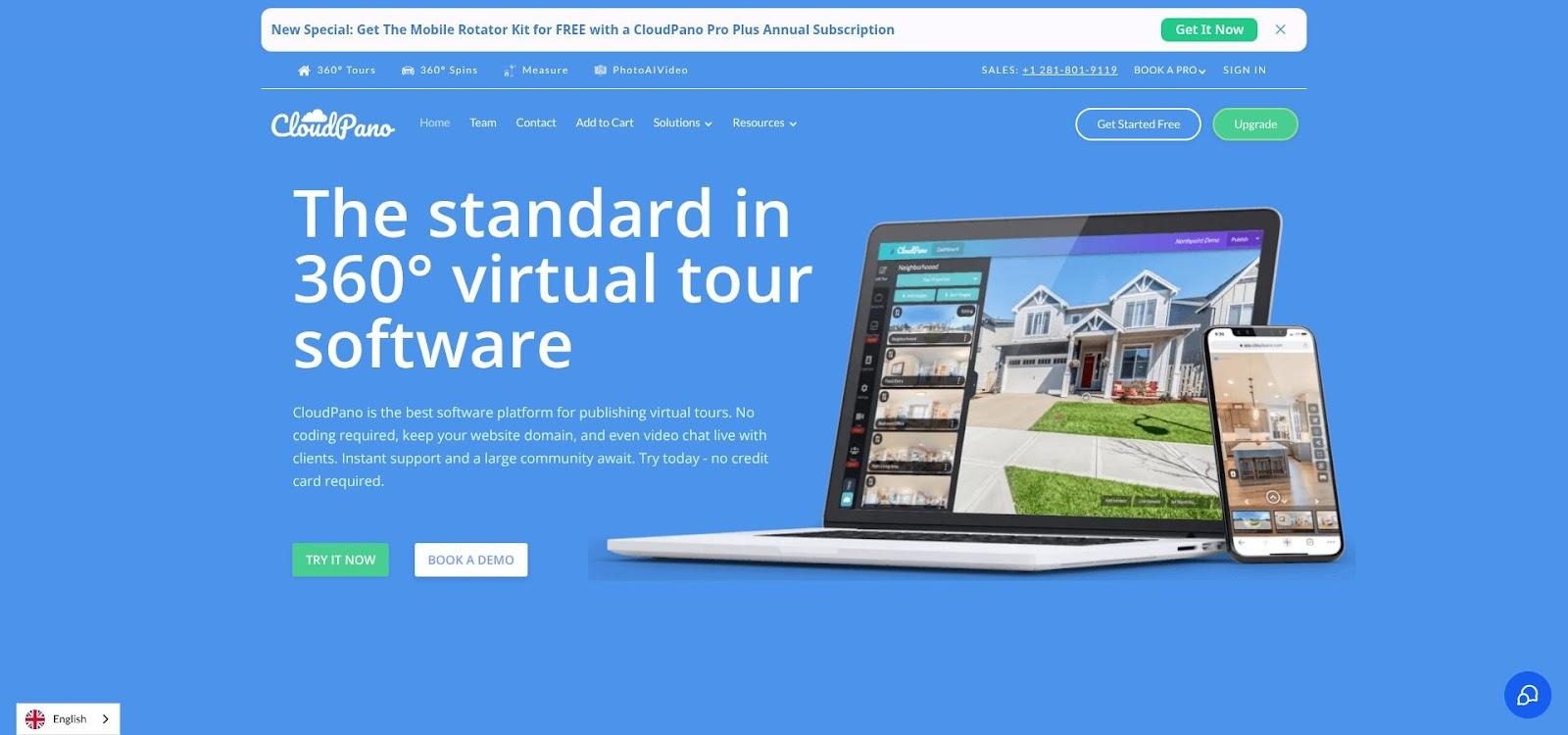
CloudPano 360 virtual tour with hotspots and dollhouse view screenshot
For agents the benefit is compliance and convenience. Each tour publishes in two versions: a branded link with your photo and call to action for social, and an unbranded URL that drops straight into MLS fields. No last-second edits or rule violations.
Need extra context? Add info tags on quartz counters or the 2024 HVAC unit. Want ambience? Include gentle music or a short voice greeting that plays when the tour loads. Buyers stay longer because they are exploring instead of watching passively.
Cost stays friendly. Nineteen dollars a month buys unlimited active tours, while occasional users can pay ten dollars once per listing. Matterport, by contrast, caps at sixty-nine dollars a month and requires a three-thousand-dollar camera.
A tour is only as good as its photos, so spend a few minutes on solid lighting and a steady tripod. Remember these are node-to-node jumps, not continuous video, so pair the tour with a short walkthrough clip for context.
Give remote buyers the freedom to walk a property at midnight and you may wake up to new showing requests by breakfast.
7. CapCut: polish phone footage and add captions in one swipe
CapCut began as TikTok’s sidekick, yet it has grown into a fast path to professional edits on any platform. If you shoot your own walkthroughs with a phone, gimbal, or drone, CapCut is where you clean them up, add captions, and export multiple aspect ratios without opening desktop software.
The AI assists earn its place on this list. One tap generates accurate subtitles in the animated “pop words” style viewers expect. Another removes pauses and filler words, trimming a five-minute clip down to sixty seconds. Need a vertical export for Reels? Smart Reframe keeps the subject centered so nothing important crops out.
Templates help too. Drop six listing photos into a trending “beat match” template and CapCut times every transition to the music pulse. The result feels custom even though you spent thirty seconds adjusting font color to match your brand kit.
Almost everything is free, watermark-free, and exports in 1080p. The Pro tier, at about eight dollars a month, unlocks 4K and extra cloud storage but is not necessary for most agents.
CapCut will not generate footage for you, but it removes the drudgery that pushes many agents away from editing. Open the app, import clips, let the AI suggest cuts, tweak captions for property details, and post. You will look as if you hired a social media coordinator, without the retainer.
8. Opus Clip: squeeze a week of social posts from one long video
Long-form content works on YouTube or as a webinar replay, but it rarely survives the scroll on Instagram or TikTok. Opus Clip solves that by using AI to mine your 5-, 10-, or 30-minute video for the best sixty-second moments, then dresses each snippet with captions, emojis, and punch-in zooms that keep mobile viewers engaged.
The workflow is simple. Paste a YouTube link or upload the raw file, click Generate, and wait about as long as a coffee refill. Opus returns a folder of vertical clips, each scored for “virality.” Post the 90-plus scorers first, schedule the rest, and you have daily content for a listing launch, market update, or buyer Q&A.
Opus Clip AI dashboard turning long real estate videos into viral clips
Auto-captions arrive in the white-text-on-black-bar style, with keywords highlighted yellow. You can trim frames, fix name spellings, or add a quick call-to-action slide, but most agents click Download and move on.
The free tier processes about an hour of source footage each month, a good starter for agents experimenting with video. The twenty-nine-dollar plan handles hours of webinars or podcasts and turns them into an ongoing supply of Shorts.
Opus shines with talking-head footage where the AI picks up voice inflection and topic shifts. It is less helpful on silent walkthroughs, so pair it with CapCut for property scenes. Together they create a film-once, slice-and-share workflow that covers every platform with minimal editing time.
9. Runway Gen-4: experimental text-to-video for bold B-roll ideas
Runway’s Gen-4 model sits on the leading edge of generative video. Type a sentence such as “slow pan of a glass-walled penthouse at golden hour,” and the model paints a new five-second scene that never existed in your camera roll.
A sprinkle of AI-made B-roll can lift production value without straining your budget. We used Gen-4 to fill a gap in a condo reel when the photographer missed a skyline shot and generated a stylized dusk panorama to slot between real photos. Viewers did not spot the swap.
The interface is lean: a prompt box, style dropdown, and resolution slider. Output arrives in about thirty seconds. Files export in vertical and horizontal formats, ready for CapCut or InVideo.
Know the caveats. Clips max out at ten seconds, occasional visual artifacts appear, and scenes are artistic stand-ins, not the actual property. Disclose that fact and treat Gen-4 as seasoning, not the main course. Pricing starts at $15 per month for the Standard plan, enough credits for about one minute of high-tier video, with extra credits available.
When weather blocks drone shots or you want to impress sellers with futuristic visuals, Runway Gen-4 delivers the extra footage that completes the story.
Comparing the contenders at a glance
We have covered a lot of ground, so here is a side-by-side look at every tool.
The table below distills the traits agents ask about most often: quality, real-estate features, speed, ease, and cost. Find the column that matters to you and you will know which platform to open first.
Tool | Best use | Output polish | RE-specific features | Time from import to video | Learning curve | Entry cost |
Leonardo AI | Cinematic B-roll intros | High (photoreal) | Minimal | 5 s per clip | One-prompt simple | Free / $12 per month |
Fliki | Narrated photo tours | Good (slideshow) | MLS & branding toggles | ≈5 min | Drag-and-drop | $28 per month |
InVideo AI | Vertical Reels / ads | Social-ready | Brand kit + captions | ≈2 min | Very low | $25 per month |
Synthesia | Avatar intros / multilingual | HD avatar video | Script + asset slots | 5–10 min | Low | $29 per month |
AutoReel | One-click MLS videos | Solid | Full MLS scrape | 8 min | Zero (paste link) | $19 credits |
CloudPano | Interactive 360° tours | Photo dependent | Dollhouse + floor plan | 15 min | Moderate | $19 per month |
CapCut | Editing & captions | Footage dependent | None (templates help) | Varies; auto-caption in seconds | Low | Free / $8 per month |
Opus Clip | Micro-content from long videos | Auto-formatted Shorts | Indirect | 1–2 min | Set-and-forget | Free / $29 per month |
Runway Gen-4 | Experimental text-to-video | Artistic HD | None | 30 s per render | Prompt based | Free / $15 per month |
Treat this matrix as a menu, not a mandate. Many agents mix two or three tools—for example, Leonardo for the opener, Fliki for the tour, and CapCut for finishing touches—because each platform covers a different part of the video workflow.
Watch-outs, workarounds, and pro moves
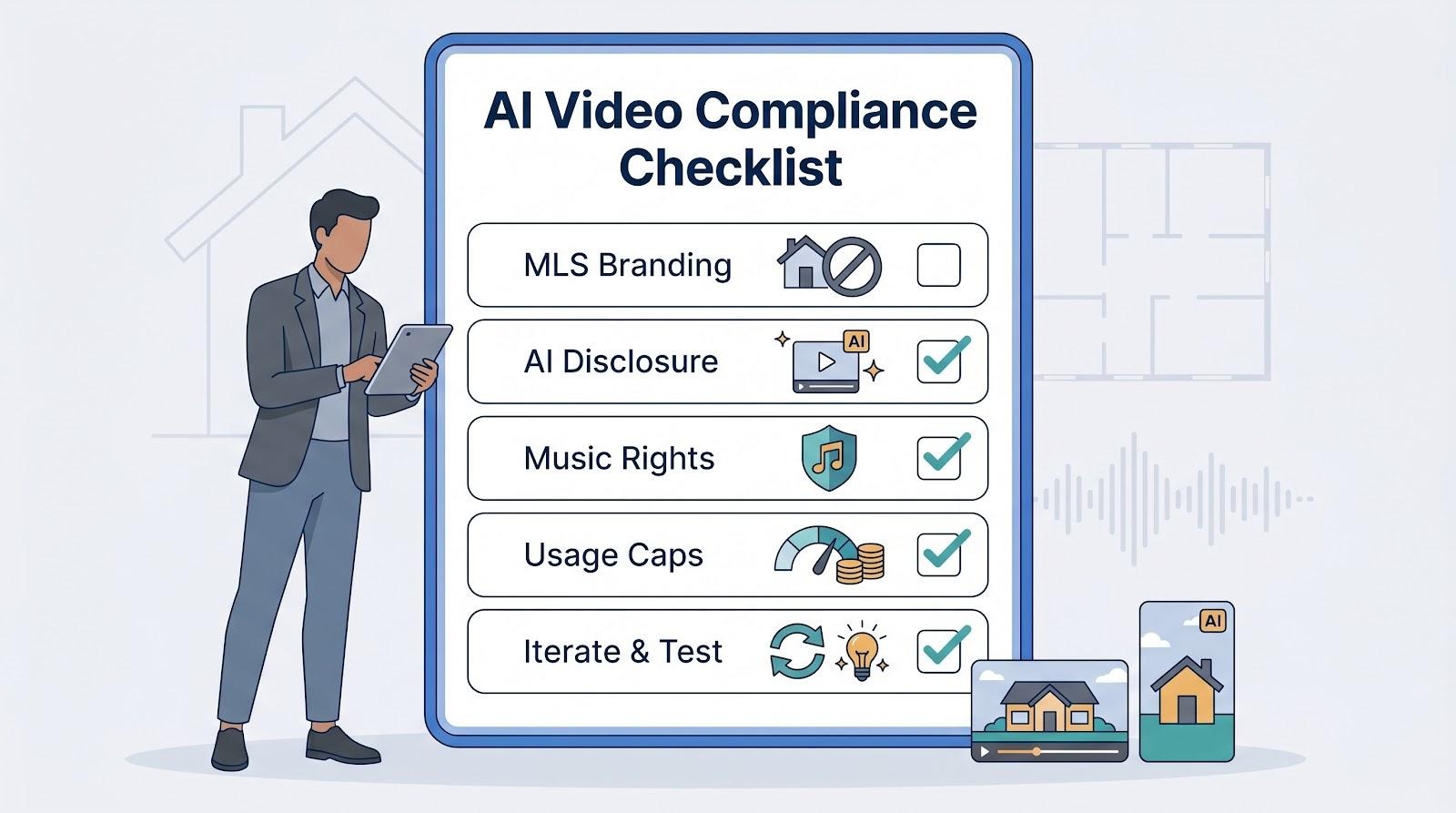
High-tech tools save time, but hidden snags can hurt credibility or even trigger MLS fines if you overlook them.
First, branding rules. Most boards ban agent logos in MLS-hosted videos. Fliki, AutoReel, and CloudPano all export unbranded versions with one click, so use them. If you stitch clips in CapCut afterward, check that no watermark or end card sneaks back in.
Second, disclosure. Generative scenes look impressive, yet they are not the house. Add “AI-generated for mood only” in the caption whenever you insert a Leonardo or Runway clip. The goal is excitement, not misrepresentation.
Third, music rights. InVideo and Fliki bundle royalty-free tracks. CapCut’s trending sounds may be licensed only for TikTok; post that same edit on Facebook and you risk a mute notice. When unsure, swap in a stock track from the platform hosting the final video.
Fourth, storage math. Token or minute caps reset monthly. If you bulk-shoot listings at the end of a quarter, you might burn through Fliki minutes in a weekend. Stagger uploads or move to the next tier for that month, then downgrade.
Finally, iterate quickly. AI outputs improve with prompts and practice. Keep a running file of winning Leonardo phrases such as “slow dolly across marble island at dusk” or Opus Clip titles that drew the most views. Reuse, tweak, and your results will compound over time.
Handle these details, and the tech fades into the background, letting buyers focus on the story every home deserves.